LCSH reconciliation
01 Jan 2016I’ve been looking at creating RDF from the XML metadata of a DRI collection. Part of this involves using OpenRefine to reconcile the metadata with other datasets, mainly dbpedia. I also wanted to add links to LCSH subjects, but was unable to find an available endpoint to use as a reconciliation service. Instead I created a local SPARQL endpoint using Apache Jena Fuseki. The following gives the steps I followed to do this.
Download Apache Jena Fuseki server from https://jena.apache.org/download/index.cgi.
Extract the download:
tar -zxvf apache-jena-fuseki-2.3.1.tar.gz
cd apache-jena-fuseki-2.3.1
The simplest way I found to create a new dataset is to start the server and use the UI.
./fuseki-server
The server should be available at the default port of 3030 http://localhost:3030. The ‘Manage datasets’ tab allows for a new dataset to be added.
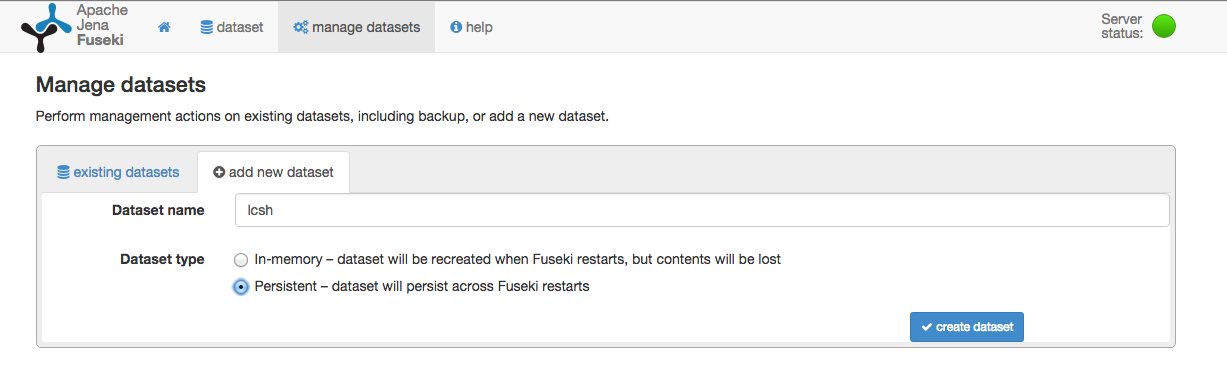
A directory will be created for the new dataset run/databases/lcsh. The next stage is to load the LCSH data.
The LCSH datasets can be found at http://id.loc.gov/download/ in various formats. I used the LC Subject Headings (SKOS/RDF) in RDF/XML, although N-triples should work also. Once downloaded and extracted the dataset can be loaded with the following command:
java -cp fuseki-server.jar tdb.tdbloader --loc run/databases/lcsh subjects-skos-20140306.rdf
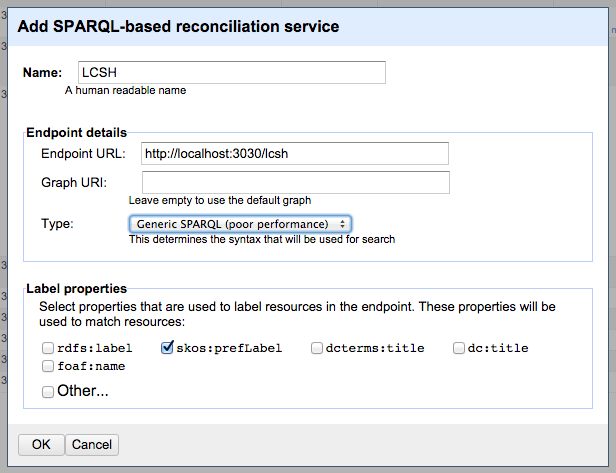
The endpoint should now be ready to use in OpenRefine. A new RDF reconciliation service is added using the address of the local Fuseki instance.
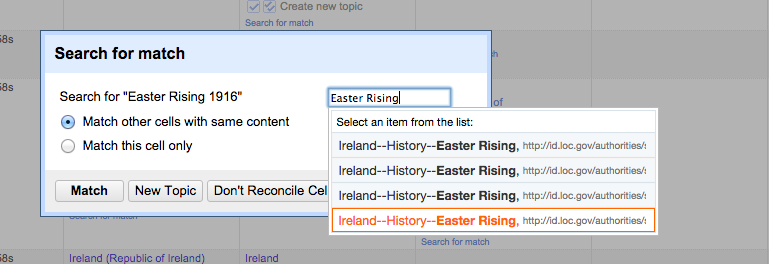
Now a column can be reconciled using this service. As an example the value “Easter Rising 1916” can be matched to Ireland–History–Easter Rising.